Displaying packeted accounts
In the Collector screen, use command 7 to view packeted accounts.
The Collector System categorizes associated packets differently, depending on how your agency has set them up.
To display packeted accounts:
- Open an account in the Collector screen.
-
At the CMD prompt, do one of the following, and press Enter:
- To display all of the accounts in the current packet, including any associated packets, type 7A.
- To display all of the accounts in the packet, type 7.
- To display all of the accounts in a packet group, type 7G.
- In the Select Group window, select a packet group, and press Enter or click Ok.
- To display or print packet member details, type 7X.
- To display or print associate packet member details, type 7XA.
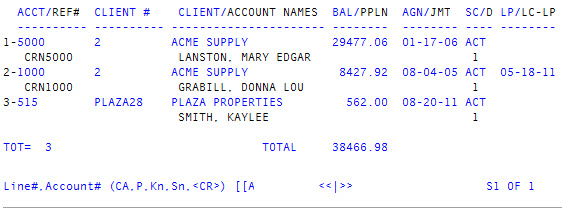
The following screen displays: