Menu 11.1 - Preclient Update
You must create a record for each precollect client. Some clients may have more than one precollect client record, depending on the type(s) of service they use.
Before you enter a client number, it is important to distinguish which type of precollect service this client will be using. The kind of client number you assign depends on the type of precollect service being used. The services available include the following:
- Letters Only – A series of letters sent to the account. When the letter series is completed, the account is canceled, whether or not any money was collected.
- Transfer to Trust – A series of letters is sent to the account. When the letter series is completed, the account can be transferred to a trust client as a trust account.
- Letters and Transfer If Meets $ Minimum – A series of letters is sent to the account. When the letters series is completed, those accounts with a specified minimum balance are transferred to trust clients as trust accounts. The other accounts are canceled.
You must create two separate client records (each with its own client number) to set up this type of service. When precollect accounts are entered, give them the client number that corresponds to their assigned amount balance. For example, if it the account is under a minimum amount, give it this client's Letter Only client number. If it is above the minimum to transfer, give it this client's transfer number.
You may use a client number that is different from the number used by this client in the trust system. If the trust number is GEN100, for example, you could use a variation of that number (GEN100B) or a completely different number (12345).
When creating a client number, the following rules include:
- The client number can be alphabetic, numeric, or a combination or both.
- The number can be up to 10 characters.
- It cannot contain asterisks, dashes, or spaces.
There is no automatic numbering system for clients so we suggest for clarity that you include part of the client's name in the client number. For example, for General Telephone, you could use GEN100.
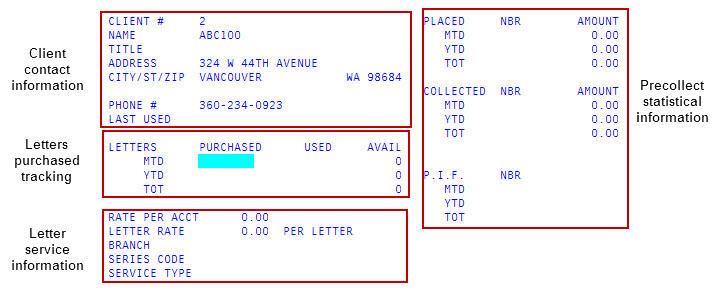
The Preclient Record screen includes several areas that allow you to store and track information regarding the numbers of letters purchased and the amount collected from the letters for the client.
- The client contact information section includes the mail and phone information needed for contacting the client.
- The Letters Purchased Used Avail section of the screen keeps track of the number of precollect letters purchased, the number used, and the number available on month-to-date, year-to-date, and total-to-date basis.
- The Letter Service section includes information regarding the rate charged to the client for each letter or account, the branch assigned to the account, the letter series code to use, and the type of service the client has requested.
- The Placed, Collected, and P.I.F. information on the right-hand side of the screen is statistical information. You can access these fields only when you are setting up a precollect client record for the first time. After you save the record, only the system updates these fields.