Menu 11.8 - Precollect Posting
Precollect posting differs from trust posting in many ways. The agency does not receive any money from precollect accounts to be held in trust for a client. All payments are received by the client and reported to the agency. Because of this, there are no transaction codes in precollect posting.
When the agency posts the precollect payment, the system subtracts the amount received from the amount owing, and records the date and amount of the payment in the account notes.
The Precollect Posting screen displays a variety of fields, only some of which you use when posting payments. The fields are grouped into three areas: account contact information, owing and received, and posting details. The fields above the line either cannot be edited directly in the Precollect Posting screen or the system updates them automatically.
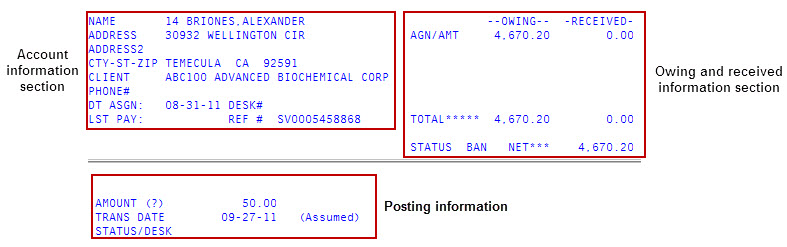
The following table describes the fields in the Precollect Posting screen
|
Term |
Definition |
|
Account Information Section |
|
|
Name |
The precollect account's name and (if present) the Name2. The Name and Name2 entries are separated by a slash (/). Example: Thomas,Martin/Thomas,Mary. |
|
Address |
The precollect account's street address. |
|
Address2 |
A second address (if present) is typically a post office box. |
|
Cty-St-Zip |
The city, state, and zip code. |
|
Client |
The client's number and name are displayed in this field (example GEN100 General Telephone) |
|
Phone# |
The account's telephone number. |
|
Dt Asgn |
The date this account was assigned to the agency. |
|
Desk# |
The desk number assigned to this account. |
|
Lst Pay |
The last date payment was received from the account. |
|
Ref# |
The client reference number. |
|
Owing and Received Section |
|
|
Agn/Amt (Owing) |
The assigned amount of the account. |
|
Agn/Amt (Received) |
The amount of any payments received by the client. |
|
Total |
The total (Owing and Received) is computed by the system. |
|
Status |
A code is used in every account record to indicate the current status of the account. |
|
Net |
The net is the difference between what the customer owes and what has been received by the client. The fields on the bottom half of the screen are used to post a transaction. |
|
Posting Section |
|
|
Amount (?) |
The amount to post to the account. There are several other options you can access in this field, which you can view by typing a question mark (?). |
|
Trans Date |
The date the amount is posted to the account. The system defaults to today's date, but you can change it if necessary. |
|
Status/Desk |
The status code for the account and the desk to which this account is assigned. |
When posting transactions, follow these rules:
- Do not use a dollar sign.
- As a shortcut, you can enter even dollar amounts without the decimal and two zeros. For example, enter $75.00 as 75.
- Use a decimal point when entering dollar and cents.
- When posting negative amounts (usually reversals), use a minus sign. For example, -12.5.