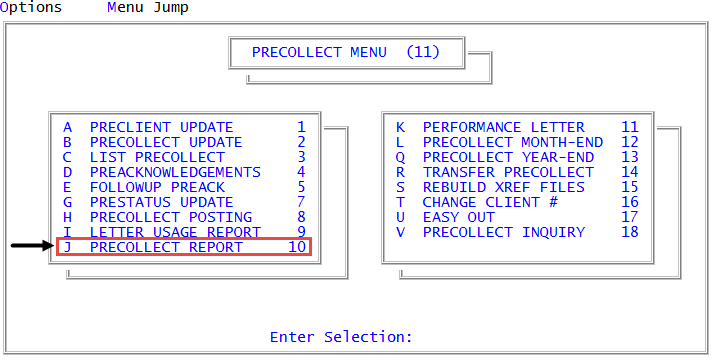
Menu 11.10 - Precollect Report
The Precollect report lists precollect client statistics since the last precollect Month-End. You can run it at any time, but you must run it before using the Precollect Month-End routine or the entire month's information will be lost.
To run the Precollect report:
-
From the Master menu, navigate to
 Precollect > Precollect Report (menu 11.10).
 - At the Exclude Preclients with No Year-to-Date Activity? prompt, click Yes or No, depending on your need.
- In the Enter Preclient Number(s) Separated by a Semicolon window, do one of the following:
- Type the preclient account numbers, separating each with a semicolon, and press Enter or click Ok.
- To include all accounts, press Enter or click Ok.
- To use a Get-List, type the list name, and press Enter or click Ok. For more information, see Working with Recall.
- At the OK to print? prompt, do one of the following:
- To send the report to the printer, press Enter or click Ok.
- To exit without printing the report, click Cancel.
The following is an example of the Precollect report:
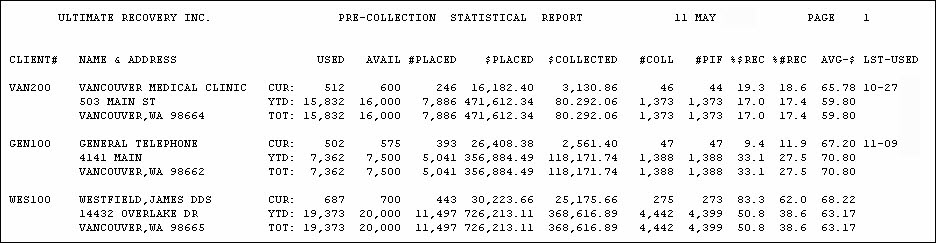
Each client's information is presented in three lines. The following table describes the fields in the report:
|
Column |
Description |
|
Used |
The number of precollect letters sent. |
|
Avail |
The number of precollect letters purchased by the client and available to be sent to precollect accounts. |
|
#Placed |
The number of precollect accounts assigned. |
|
$Placed |
The dollar amount assigned to the agency for precollect. |
|
$Collected |
The dollar amount collected. |
|
#Coll |
The number of accounts from which payment (full or partial) was received. |
|
#Pif |
The number of paid in full accounts. |
|
%$Rec |
The percentage of dollar assignment recovered. This is the $Collected figure divided by the $Placed figure, expressed as a percentage. For example, $3,130.86 ($Collected) divided by $16,182.40 ($Placed) equals .193, or 19.3%. |
|
%#Rec |
The percentage of assignments recovered by the agency. This is the #Coll figure divided by the #Placed figure, expressed as a percentage. For example: 46 (#Coll) divided by 246 (#Placed) equals .186, or 18.6%. |
|
Avg-$ |
The average dollar amount of each assignment. |
|
Lst-Used |
The last date precollect letter service was used by the client. |