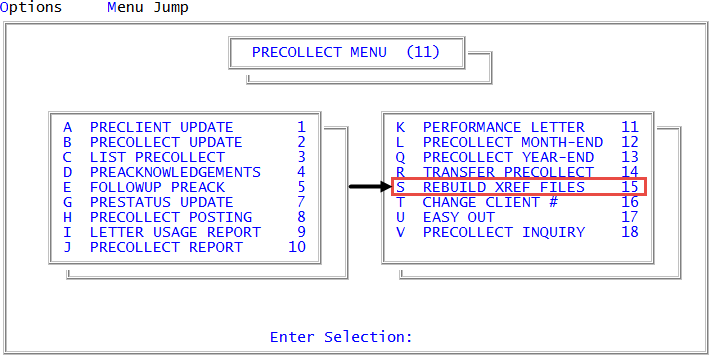
Menu 11.15 - Rebuild Xref Files
Precollect accounts deleted with the DEL option in Precollect Update remain in the precollect account inquiry cross-reference files. When you remove precollect accounts with the Transfer Precollect option, the system leaves only an account number in the cross-reference file. When you perform an inquiry, the lone account number displays in its original alphabetical order without any name, address, or other information.
The Collector System automatically removes cross-references after you run Precollect Month-End.
Rebuilding cross-reference files after deleting precollect accounts
Use this option to rebuild cross-reference files after deleting precollect accounts.
To rebuild cross-reference files after deleting precollect accounts:
-
From the Master menu, navigate to
 Precollect > Rebuild Xref Files (menu 11.15).
 - At the prompt warning you to run this routine only at low-density times and to not interrupt it, to continue, click Yes.
- In the Select Files to Rebuild window, all the files are automatically selected. If you choose not rebuild a file, select it to unhighlight it. To continue, press Enter or click Ok.
-
At the Clear files before rebuilding? prompt, do one of the following:
- To clear all information out of the files and rebuild them from scratch, click Yes.
- To not clear all the information, click No. Proceed to Step 9.
You can save time by not clearing the files first, but old, obsolete cross-reference information can be left in the files, causing errors and causing the system to perform slower.
-
At the Is this a restart after a break or abort? prompt, do one of the following:
- To restart the program if it is interrupted, click Yes.
- To skip restarting the program if it is interrupted, click No. Proceed to Step 9.
Because rebuilding can take such a long time, occasionally the rebuild program has to be interrupted. If you restart the program later in the day or even the next day, click Yes.
- At the prompt warning you that restarting will skip a specific number of accounts or notes before resuming cross-referencing, click Ok.
-
In the Enter # of Accounts to Skip window, do one of the following:
- To begin the restart exactly where the abort or break took place, type the abort number, and press Enter or click Ok.
- To skip rebuilding files, but begin rebuilding notes, press Enter to accept the Notes default.
We recommend you clear the fields first. When restarting the rebuild program after a break or abort, it is important to begin the restart approximately where you left off. Otherwise, the system duplicates the cross reference files already rebuilt.
- At the Enter # of accounts/notes to Skip window, do one of the following, and press Enter or click Ok:
- To begin the restart exactly where the abort or break took place, type the abort number.
- To skip the rebuilding of files, but begin rebuilding notes, type NOTE.
- At the Rebuild Completed prompt, press Enter or click Ok.