Creating or changing client settlement rules
While your agency may have their own settlement guidelines, your clients may have settlement guidelines that differ from those of your agency. In that case, you can set up a settlement rule specifically configured for your client.
To create or change a client settlement rule:
-
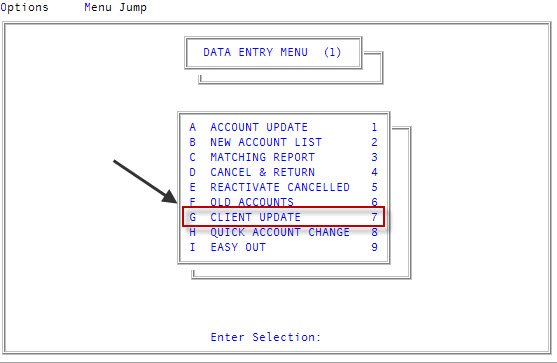
From the Master menu, navigate to
 Data Entry > Client Update (menu 1.7).
 You can also access this routine from Management Strategy > Client > Client Update (menu 10.6.60).
-
At the Enter Client # (?, /) prompt, type the client number to create a settlement for, and press Enter.
For a list of the commands available in this field, see Using client # prompt options.
-
In the Cli Name field, type /C, and press Enter.
In the Cli Name field, if you forget to type / before the C, a warning message displays asking you to confirm that you want to change the client's name.
Note: For a list of the commands available in this field, see Using client name field options.
-
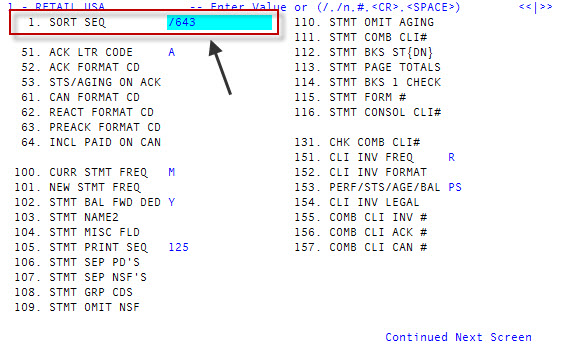
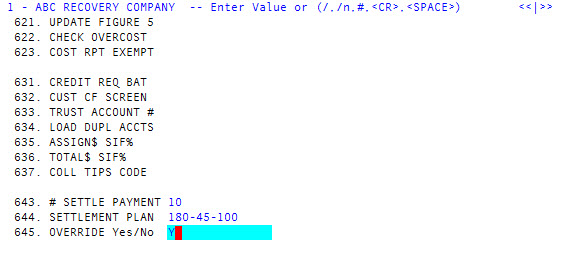
In line 1, type /643 to advance to field 643, and press Enter.
-
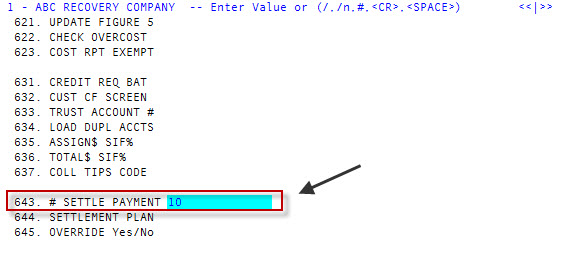
In field 643, # Settle Payment, type the maximum number of payments in which a settlement plan must be completed for this client, and press Enter.
-
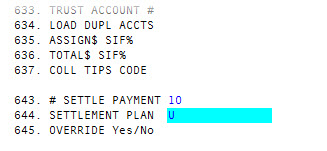
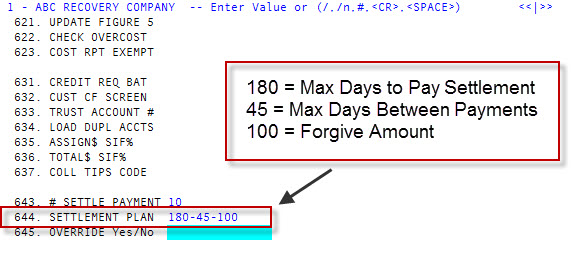
In field 644, Settlement Plan, type U, and press Enter.
-
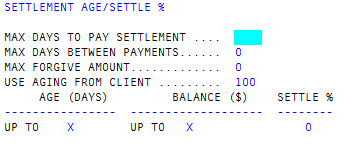
In the Max Days To Pay Settlement field in the Settlement Age/Settle % screen, type a number, and press Enter.
- In the Max Days Between Payments field, type a number, and press Enter.
- In the Max Forgive Amount field, type the maximum amount the client will forgive on a debt, and press Enter.
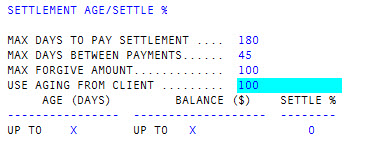
- In the Use Aging From Client field, do one of the following:
- To copy and use the agency settlement rules, type Agency, and press Enter.
- To copy and use the settlement rules of another client, type the client number from which to copy, and press Enter.
If you do not want to copy any settlement rules, do not make any changes, and press Enter.
The field defaults to the current client's client number.
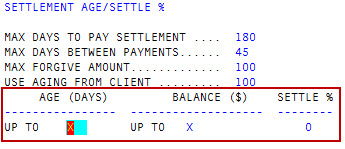
- To create new rules, do the following:
In the Age (Days) field, type the maximum age of the account before it qualifies for a settlement, and press Enter.
The default for this field is X, which means any account with any date qualifies for a settlement.
In the Balance ($) field, type the maximum balance the account must have to qualify for a settlement, and press Enter.
The default for this field is X, which means any account with any balance qualifies for a settlement.
- In the Settle % field, type the percentage amount the client is willing to settle based on the age and balance of the account, and press Enter.
For example, if you type 1, users can create a settlement for one percent of the total balance.
The details of the client's settlement plan that you entered in the Settlement Age/Settle % screen now
display in the Settlement Plan field.
- In field 645, Override Yes/No, do one of the following, and press Enter:
- To allow another user with appropriate authorization to override the settlement rule for this client, type Y.
To only apply the client settlement rule, type N.
Any role profiles, including overrides, no longer apply. Neither the collector or any other user in the agency can override the client rule.
-
At the Ok to File (?) prompt, type Y, and press Enter.
A message displays that the Control Record has been filed. The client update page displays.
- To exit the screen, type # in any field, and press Enter.
- At the OK to File? (Y, N, /) prompt, do one of the following, and press Enter:
- To save your changes, type Y.
- To discard your changes, type N.
- To continue making changes, type /.
To continue configuring or updating settlement rules, do one of the following, depending on how you plan on using settlement plans at your agency:
- To configure account settlement rules, see Configuring the account record to store settlement plan information.
- To configure agency settlement rules, see Creating or changing agency settlement rules.
If you have completed creating settlement rules, assign it to a role profile. For more information, see Role profile settlement rules. If you are updating the settlement rule, The Collector System automatically updates the role profiles.