Payment history
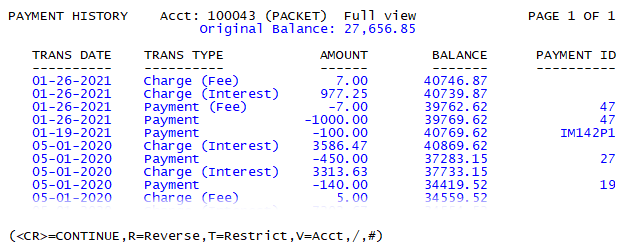
You can view the payment history for an account using the PH command from the command prompt of the collector screen.
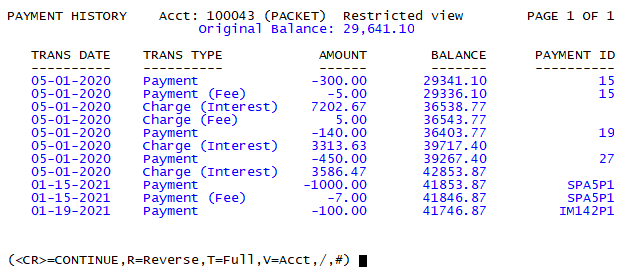
The payment history screen offers multiple views of an account or packet payment history. Full view displays all payment history for an account, regardless of status code. If your agency restricts consumer access for certain status codes, you can use command T to toggle restricted view—showing only payment history from non-restricted status code accounts.
The V command allows users to toggle between a packet or account view of payment history and is only available for accounts which are packeted.
The order of the payment history can be reversed by using the R command to sort payments on screen from newest to oldest.
- Open an account in the Collector screen.
- At the CMD prompt, type PH, and press Enter.
-
To toggle between full view and restricted view, type T, and press Enter.
The Collector System displays the current view at the top of the screen.

-
To toggle between viewing payments for the entire packet or an account, type V, and press Enter.
The Collector System displays
PACKETat the top of the screen when in packet view.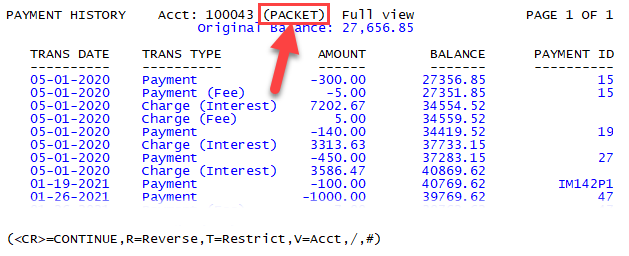
-
To toggle the order of payments from first to last, type R, and press Enter.
The Collector System displays the reverse order of payments with most recent payments listed first.