Reporting a dispute resolution to the credit reporting agencies
Use this option to notify the credit reporting agencies that the dispute that was previously reported is resolved.
To report a dispute resolution:
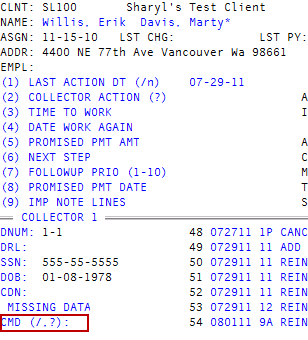
- Open an account in the Collector screen.
-
At the
 CMD prompt, type DP.
 - In the Credit Reporting Actions window, select Report Dispute is Resolved, and press Enter or click Ok.
-
In the Dispute Resolutions - Compliance Condition Code window, select a code, and press Enter or click Ok.
The following table lists each code and its description:
Code
Description
XC
The consumer agrees with the results of an investigation into the Fair Credit Reporting Act.
XE
The consumer requests that the account be closed, the investigation is complete, and the consumer disagrees with the results of the investigation.
XG
The consumer disagrees with the resolution of the dispute related to the Fair Credit Billing Act.
XH
The data furnisher reports that the account formerly in dispute is now resolved.
XR
The most recently reported compliance condition code is removed.
XA
The consumer requests the account be closed.
- In the Enter New Status Code (?) window, type a new status code, and press Enter or click Ok.
- If the account is packeted, in the Update Packet Members? window, do one of the following; otherwise, proceed to Step 11:
- To apply the update to all packet members, click Yes.
- To not apply the update to packet members, click No. Proceed to Step 12.
- To apply the update to the packet members of your choice, click Select. Proceed to Step 9.
- At the Ok To Proceed (Y/CR=N) prompt, do one of the following:
- To proceed, type Y, and press Enter.
- To not proceed, press Enter or type N, and press Enter. Proceed to Step 12.
- At the Action accepted for debtor number prompt, click Ok. Repeat for each packet member, and then proceed to Step 12.
- At the Ok To Proceed? (Y/CR=N) prompt, do one of the following:
- To proceed, type Y, and press Enter.
- To not proceed, press Enter or type N, and press Enter. Proceed to Step 12.
- At the Ok to Update Account number prompt, do one of the following:
- To update the account, click Yes. Repeat for each packet member.
- To not update the account, click No. Repeat for each packet member.
-
At the Action accepted for debtor number prompt, click Ok.
If the account is packeted, repeat for each packet member.
- At the CMD prompt, do one of the following:
- To report another dispute resolution, repeat Step 2.
- To cancel, type /, and press Enter.