Requesting or reinstating credit reporting
Use the following option to request or reinstate credit reporting for an account.
To request or reinstate credit reporting:
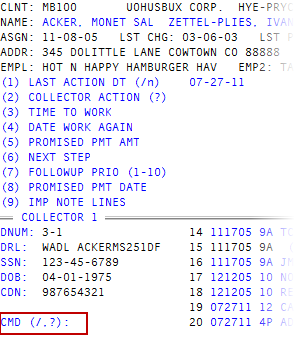
- Open an account in the Collector screen.
-
At the
 CMD (/, ?) prompt, type CN, and press Enter.
 - In the Credit Reporting Actions window, select Cancel/Stop Credit Reporting, and press Enter or click Ok.
- In the Enter New Status Code (?) window, do one of the following, and press Enter or click Ok:
- Type the new status code.
- To see a list of status codes, type ?.
- In the Status Codes window, choose a status code, and press Enter or click Ok.
-
Do one of the following:
For an account not in a packet
- At the Ok To Proceed (Y/CR=N) prompt, type Y.
- At the Action accepted for debtor number? press Enter, or click Ok.
For all the accounts in a packet
- At the Apply updates to all packet members? prompt, click Yes.
- At the Ok To Proceed (Y/CR=N) prompt, type Y, and press Enter.
- At the Action accepted for debtor number? press Enter, or click Ok. Repeat this step for each account in the packet.
For only a single account in a packet
- At the Apply updates to all packet members? prompt, click No.
- At the Ok To Proceed (Y/CR=N) prompt, type Y, and press Enter.
- At the Action accepted for debtor number? press Enter, or click Ok.
For multiple accounts in a packet
- At the Apply updates to all packet members? prompt, click Select.
- At the Ok To Proceed (Y/CR=N) prompt, type Y, and press Enter.
- At the Ok to Update Account number prompt, click Yes or No. Repeat as necessary for each account in the packet.
- At the Action accepted for debtor number? press Enter, or click Ok. Repeat for each of the accounts you requested or reinstated credit reporting for.
- At the CMD prompt, to exit, type /, and press Enter.