Searching for accounts with the same contact information
You can search The Collector System for all accounts that currently have the same contact information as a specific account.
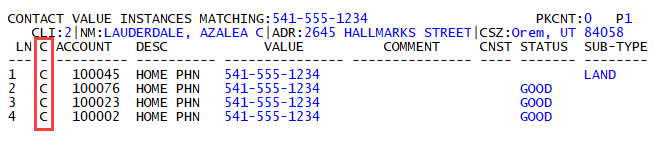
For example, a collector at a fictitious agency, Lake Assets, wants to search for all of the accounts that have the same home phone number as account 100045. When the collector uses command /SEARCH in the Value field of line 1, The Collector System searches for all of the accounts with a current home phone number of 541-555-1234, and displays them.
You can also search for accounts that at one time had the same contact information as another account.
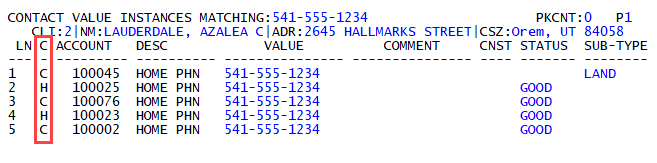
For example, account 100025 currently has a home phone number of 301-555-1106, but it used to have the same home phone number as account 100045. By using command /SH, The Collector System not only displays the accounts that currently use the home phone number of 541-555-1234, but also any accounts that used this home phone number in the past, including account 100025.
In the screen, the C column shows you which contact information is currently being used by an account (C - Current) and which were used by an account in the past (H - Historical).
You can only use the search functionality for contact information if cross-referencing is turned on for the Personal Contacts screen. For more information, see Activating or deactivating contact management options.
To search for accounts with the same contact information:
- Open an account in the Collector screen.
- At the CMD prompt, type PC, and press Enter.
-
In the Personal Contacts screen, at the CMD prompt, type U and the line number to search on, and press Enter.
For other ways to navigate to a line number or field, see The Personal Contacts screen.
-
Do one of the following:
 List all accounts with a current contact value that matches the current value
In the Value field, type /SEARCH, and press Enter.
List all accounts with a current and former contact value that matches the current value
In the Value field, type /SH, and press Enter.