Starting or stopping accounts on strategies
Use command SS to stop or start an individual account on a strategy. If you enter a standard strategy (not a parallel or side action strategy) for an account already on a standard strategy, it stops the current strategy and changes it to the one you enter. Sometimes your agency restricts unauthorized individuals from starting or stopping a strategy. Your system administrator must give you user login permission to start or stop restricted strategies.
Command SS allows you to start or stop the following types of strategies:
|
Strategy Type |
Description |
|
Standard |
A set of conditions, events, and actions that regulate and automate your normal collections workflow processes. This type of strategy runs during Day-End to help organize and prioritize accounts before The Collector System builds the WIP for the next day's work. An account can only run through one strategy at a time. |
|
Parallel |
This type of strategy allows you to create strategies that can monitor and complete different business processes outside of your normal collections workflow, such as legal or compliance processing. These strategies run either before or after The Collector System builds the WIP at Day-End. Unlike standard strategies, accounts can run through multiple parallel strategies at the same time. The Collector System differentiates parallel strategies from other strategies by appending the characters ^P to the end of the strategy name. |
|
Side Action |
A special type of strategy that allows you to perform one-off tasks on one or more accounts while they continue to run on the current standard or parallel strategy. This type of strategy contains only actions and no events or next strategies. The Collector System differentiates side action strategies from other strategies by appending the characters ^S to the end of the strategy name. |
Your user login controls access to this command. If your system administrator has not given you permission, you cannot use this command.
When you start or stop a strategy using this command, The Collector System displays all of the strategies the account is running on. If the account is running on less than two strategies, The Collector System lists them directly on the Collector screen, as shown below:
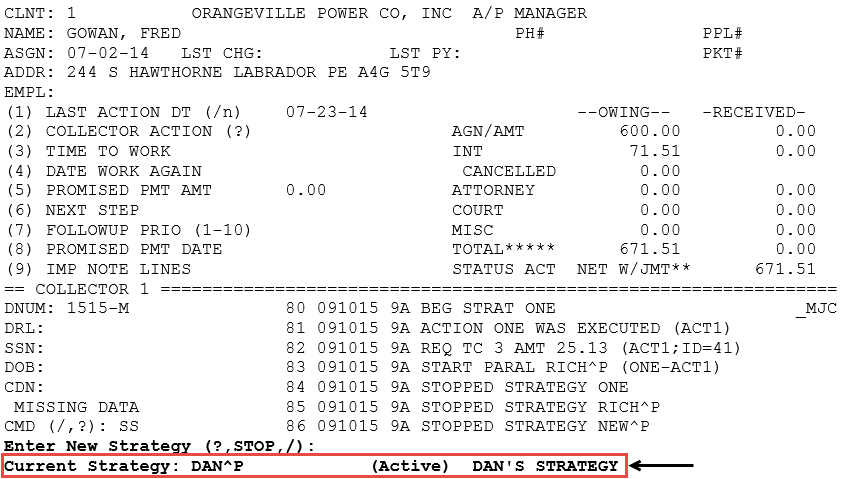
If the account is running on two or more strategies, the Current Strategies for account number screen displays to provide more room on the screen for the list, as shown below:
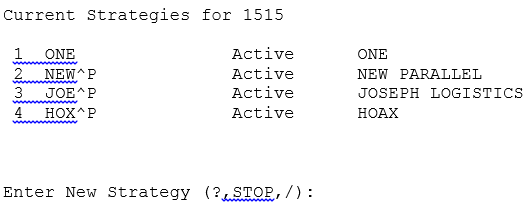
The screen also displays the status of the strategy running the account. The status displays in parenthesis next to the strategy name, as show below:
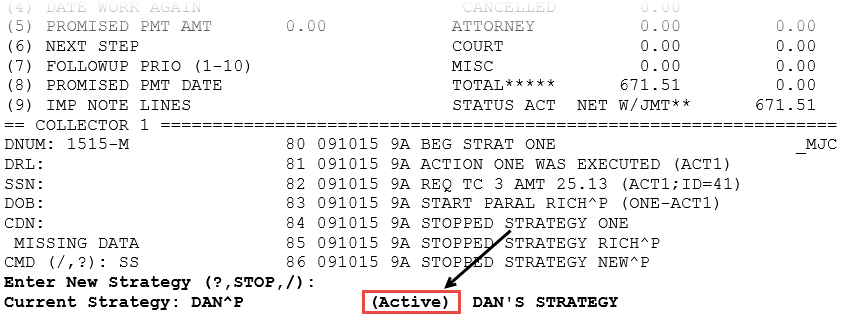
A strategy can one have one of three statuses:
- Active—The account is currently running in the strategy.
- Pending—The account is not running in the strategy because Day-End has not yet run. This status only applies to parallel strategies, which only run at Day-End.
- Suspended—The account is not running in the strategy because the account is on a payment plan. This status only applies to standard strategies.
To start or stop an individual account on a strategy:
- Open an account in the Collector screen.
- At the CMD prompt, type SS, and press Enter.
-
At the Enter New Strategy (?, Stop, /) prompt, do one of the following:
The Stop command only displays in the prompt if the account is currently running a strategy.
 Start an account on a strategy
- Do one of the following:
- If you know the strategy name, type it.
- To view a list of available strategies, type ?.
- If the account is a part of a packet, at the Start Strategy on Packet Members With No Active Strategy (Y, N, (S)elect) prompt, do one of the following, and press Enter:
- To start the strategy on all other packet members without an active strategy, type Y.
- To start the strategy only on this packet member, type N.
- To select which packet members to start the strategy on, type S.
- At the X OK? (Y, CR=N) prompt, do one of the following, and press Enter:
- To start this packet member on the strategy, type Y.
- To not start this packet member on the strategy, type N.
- At the X OK? (Y, CR=N) prompt, do one of the following, and press Enter:
Stop an account on a strategy
- Type Stop, and press Enter.
- In the Current Strategies for account number screen, at the Enter New Strategy (?, Stop, /) prompt, type Stop, and press Enter.
- At the Enter Number to Stop (number, All, /), do one of the following, and press Enter:
- To stop a specific strategy, type the number next to the strategy name.
- To stop all of the strategies, type All.
- If the account is a part of a packet, at the Stop Strategy on Entire Packet (Y, N, (S)elect) prompt, do one of the following, and press Enter:
- To stop the strategy on all other packet members, type Y.
- To stop the strategy only on this packet member, type N.
- To select which packet members to stop the strategy for, type S.
- At the account number/account name/packet number/status code OK? (Y, CR=N) prompt, do one of the following, and press Enter:
- To stop this packet member on the strategy, type Y.
- To keep this packet member running on the strategy, type N.
- At the account number/account name/packet number/status code OK? (Y, CR=N) prompt, do one of the following, and press Enter:
- To exit the routine, at the Enter New Strategy (?, Stop, /) prompt, type /, and press Enter.
The Collector System enters a note that the strategy started on the account and any action taken as a result, if your agency is set up to do so.
- Do one of the following: