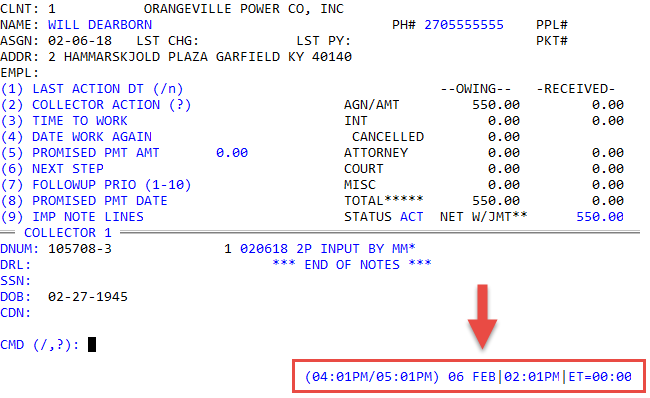
Understanding the areas of the Collector screen
The Collector screen contains the following six areas.
|
Area |
Description |
|
Account Information |
General and demographic information about the customer |
|
Tickler |
Collector action information for the account |
|
Additional Account Information |
Customer identification information |
|
Owing and Received |
Current amounts owing and received for this account |
|
Notes |
System and collector notes for the account |
|
Command Prompt |
Area to enter all collector commands |
|
Date and Time |
Date and time information for the agency and account |
Account Information area
The account information area contains the most basic information about the person from whom you are trying to collect a debt.
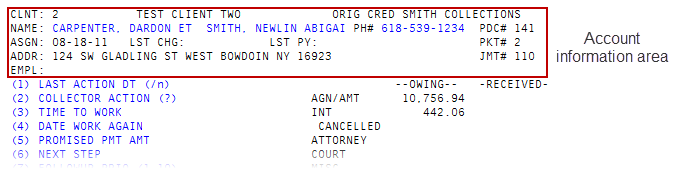
 Field descriptions
|
Field |
Description |
|
Clnt |
Number of the client who owns this account. |
|
Name |
Customer's name in the format "last name, first name". |
|
Ph# |
Customer's phone number. |
|
Ppl# |
Payment plan number for this account (if applicable). |
|
Asgn |
Date the account was assigned to the agency. |
|
Lst Chg |
Last date the client charged the account for any services or goods. |
|
Lst Py |
Date the last payment was received by the client or the agency on the account (automatically updated). |
|
Pkt# |
Packet number for this account (if applicable). |
|
Addr |
Customer's address listed by street, city, state, and zip code. |
|
Jmt# |
The judgment number if the account is part of a judgment. |
|
Empl |
Employer name(s) and phone number(s). |
Tickler area
The Tickler area contains information about the collection activities performed on an account, including information regarding whether the account has previously been worked, when it will be worked again, what actions should be taken next, and whether any promised payments exist on the account.
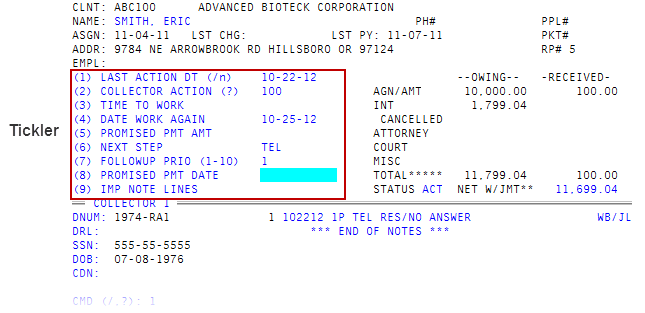
The Tickler area allows collectors to enter important status information about the account and contains nine fields, each influential in handling the account. Each field guides the system or the collector toward the next step in account handling.
Field descriptions
|
Field |
Description |
|
Last Action Dt (/n) |
(Last Action Date) The date the account was last worked. |
|
Collector Action (?) |
The numerical action code associated with any work done on the account. |
|
Time To Work |
The time the account is brought up for the collector to work. |
|
Date to Work Again |
The date the account again displays on the collector's WIP. |
|
Promised Payment Amount |
Dollar amount that was promised by the customer to be paid on a certain date; used in conjunction with the Promised Payment Date field. |
|
Next Step |
A brief explanation of what the next action the collector should take on the account. |
|
Follow-up Priority |
A numeric value from 1 to 10 designating priority level of the account. Use with caution, since overuse of this feature causes accounts from other categories (New Business, Required Work, and so on) to not display on a collector's WIP. |
|
Promised Payment Date |
The date a customer has agreed to pay a specified amount; used in conjunction with the Promised Payment Amount field. |
|
Important Note Lines |
The number(s) that identify note lines containing urgent information about the account. The system flags notes designated as important and causes them to display at the top of the notes section with an asterisk (*) to the left of the line number. |
Additional Account Information area
The Additional Information area of an account shows information that clients can use to identify accounts and in credit reporting.
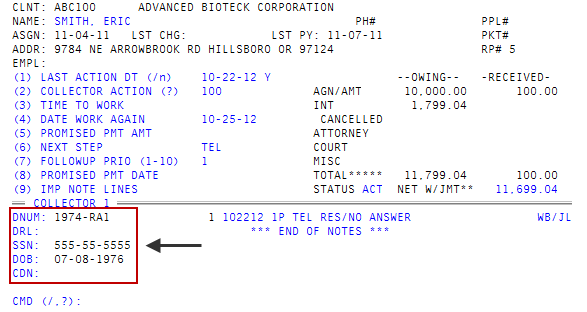
Field descriptions
|
Field |
Description |
|
DNum |
The account number and the desk number, separated by a hyphen. When an account is packeted, the system shows the account number for the primary packet member to the right of the desk number. If viewing the primary packet member, no packet number is shown. |
|
DRL |
The data reference line, which contains account-specific information assigned by the agency. |
|
SSN |
The customer's social security number. |
|
DOB |
The customer's date of birth. |
|
CDN |
The client data number, or client reference number, which is generally used to store the account number assigned by the client. |
Owing and Received area
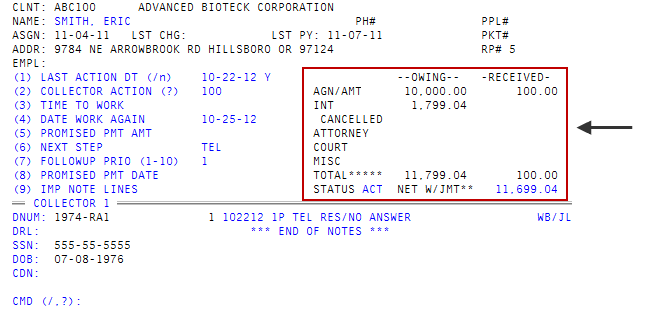
The Owing and Received area contains a listing of current charge and payment balances on an account.
Field descriptions
|
Field |
Description |
|
Agn/Amt |
The amount to be collected from this account. |
|
Int |
The amount of interest owed on this account and accrued while assigned to the agency. |
|
Attorney |
The amount of attorney fees owed, if any. |
|
Court |
The amounts of court costs owed, if any. |
|
Misc |
The amount of other fees owed, if any. |
|
Total |
The total amount of all the charges owed for the account. |
|
Status |
The status of the account. |
|
Jmt |
The amount owed by order of judgment. If the account is not in a legal status, the system displays two asterisks (**). |
Notes area
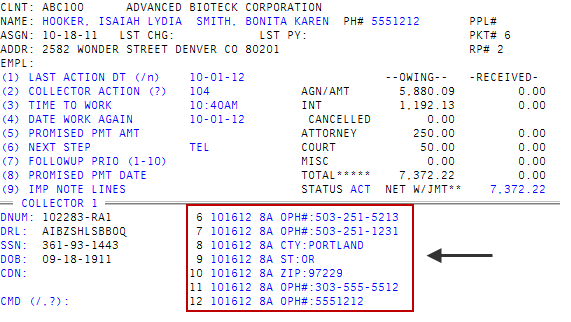
The Notes area allows you to view the seven most recent or important note lines on the Collector screen You can add or view notes using specific commands from the Command Prompt.
Command Prompt area
The Command Prompt area allows for a wide variety of actions to be taken while working in an account.
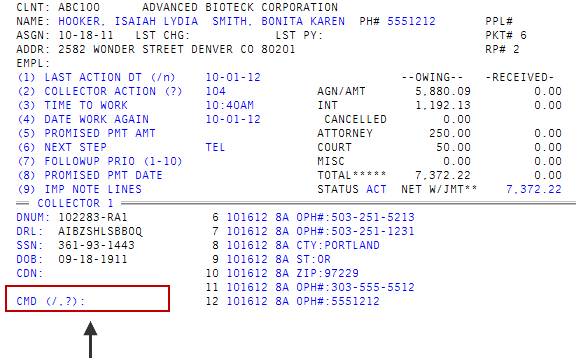
You can view a list of all available commands by typing ? at the Command prompt.
Date and Time area
The Date and Time area displays the date and time for your agency, the account, and the Elapsed Time (ET) since the account was opened on your screen.