Sample commission code
Before entering your commission code, it is extremely important to carefully plan the code. The commission code rates must be set up in a priority sequence from top to bottom. The system searches down through the code and when it encounters a criterion that fits, it applies that commission percentage. In this example, a client requests a variable rate commission code to meet the following parameters:
SAMPLE CODE PARAMETERS
|
1. All legal accounts based on the time since client's last charge/last pay date |
|
|
30% |
|
|
40% |
|
|
50% |
|
|
2. All forward accounts 0 to 90 days since the assigned date |
35% |
|
3. All skip accounts with an assigned amount less than $150 |
45% |
|
4. All skip accounts with an assigned amount greater than $150 |
35% |
|
5. All other accounts 0 to 90 days from client's last charge/last pay date to the assigned date |
30% |
|
6. All other accounts less than $500 |
20% |
|
7. All other accounts with an assigned amount between $500 and $1000 |
15% |
|
8. All other accounts with an assigned amount greater than $1000 |
13% |
The following example of the Commission Code Update screen shows how the sample code parameters in the preceding table would be implemented in the Commission Code table:
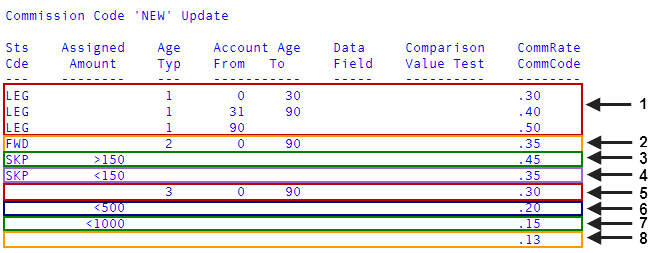
If there is no match because of status code, age, and so on, subsequent lines are checked until a match is found.
Enter the most restrictive conditions first, with the categories getting broader and less restrictive farther down the list. After entering all commission code criteria, enter a pound sign (#) at the next field to go to the OK to File? prompt.