Updating the regular History report
Use this routine to update the regular client History report with initial collection statistics for at least the last three years. There are 11 screens where you need to enter information. The following table describes each screen.
|
Screen name |
For each month, enter: |
|---|---|
|
1 - # Assigned |
The number of assignments placed by this client. |
|
2 - Amt Assigned |
The dollar amount of assignments, including adjustments, placed by this client. |
|
3 - Amt Collected |
The amount of principal collected. |
|
4 - Commissions |
The amount of commission the agency earned on collections. |
|
5 - # Cancelled |
The number of accounts canceled by the client, or considered uncollectible by the agency. If your agency is set to break out agency-type from client-type cancellations, the name on this screen is # Canceled (Total). Contact your Finvi Support representative to learn more about setting up the cancellation routine. |
|
6 - Amt Cancelled |
The dollar amount of unpaid principal on canceled or uncollectible accounts. If your agency is set to break out agency-type from client-type cancellations, the name on this screen is Amt Canceled (Total). Contact your The Collector System representative to learn more about setting up the cancellation routine. |
|
7 - # of PIFs |
The number of accounts paid in full. |
|
8 - Average Age |
The average age of the client's accounts. |
|
9 - (Agency) |
The number of agency-initiated cancellations each month. This screen only displays if the agency is set to break out agency-type from client-type cancellations. Contact your Finvi Support representative to learn more about setting up the cancellation routine. |
|
10 - Amt Cancelled (Agency) |
The dollar amount of agency-initiated cancellations each month. This screen only displays if the agency is set up to break out agency-type from client-type cancellations. Contact your Finvi Support representative to learn more about setting up the cancellation routine. |
|
11 - Assign Amt Adjustments |
The total amount of the adjustments that produced the totals show on screen 2 - Amt Assigned(Net of Adjustments). |
The cursor starts on each screen in the month corresponding to the last Month-End run by your agency.
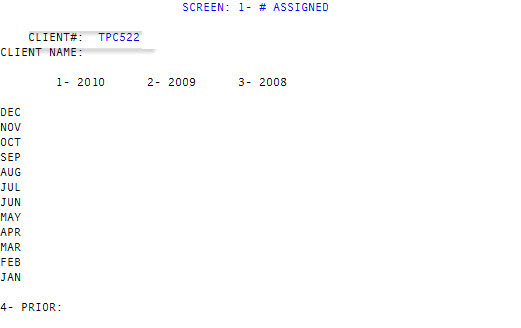
To navigate each screen do the following:
- To move to another column, type /column number.
- To move to the another month in a column, press Enter until you reach the correct month.
- Click the desired field in any column with your mouse.
Entering X in any month field causes all statistical information, from every screen, for that year and any prior years, to be put into the "prior" category. For example, if you enter X in the May field of 2009, no yearly totals print for 2009 or any year prior to 2009. All of that information prints in the category titled Prior.
To update the regular History report:
-
From the Master menu, navigate to
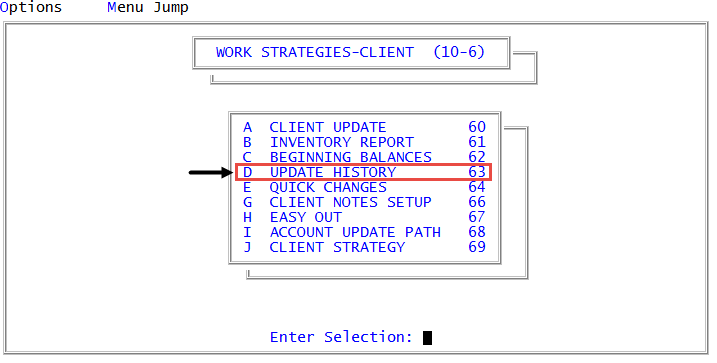
 Management Strategy > Client > Update History (menu 10.6.63).
 - In the History Report Setup window, select Regular History Records, and press Enter or click Ok.
-
In the Client# field of the screen 1- # Assigned, type the code your agency uses to identify this client, and press Enter.
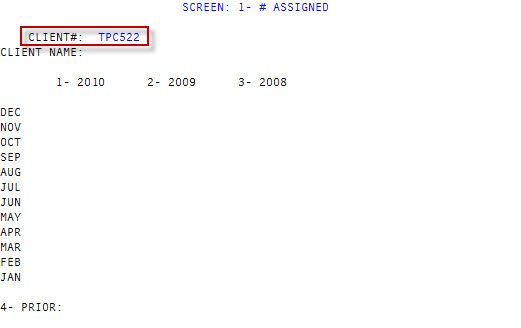
The system automatically fills the Client Name field after you enter the client number.
-
Type the number of assignments received each month in the month field of the column corresponding to the correct year.
If you are lacking monthly totals for each year, but you have a yearly total, you can enter the yearly total in a single month (usually December). This information prints in the Year column of the History report.
- When you finish entering historical information on the screen, type # in any field, and press Enter.
-
At the OK to File? (Y, N, Sn, /) prompt, type Sn, where n is the number of the next screen to enter historical information in, and press Enter.
Do not select Y at any of the screens OK to File? (Y, N, Sn, /) prompt until you are ready to leave this client record.
- Repeat Steps 4-6 for each of the 11 screens, entering the appropriate type of information for each screen (for example, dollar amounts, age, number of accounts, and so on).