Working with strategy events
The Collector System considers any change that happens to an account an event. More than one event is called an event set. You add events in the Strategy Events screen.
The system evaluates the first line in an event set. If the event on that line has not occurred, the system checks the subsequent lines until it finds an event in the list that has occurred. Enter events in the order in which they should be evaluated.
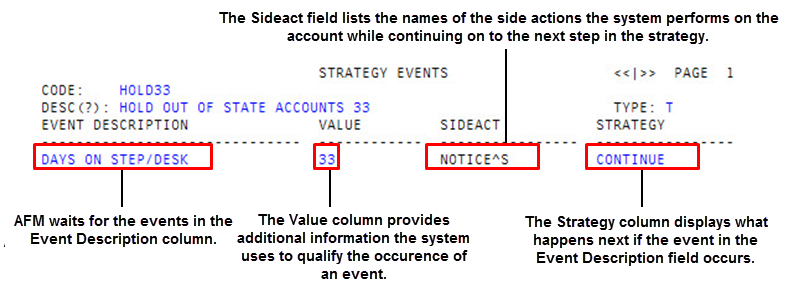
The columns of the Strategy Events screen include the following:
-
Event Description – Contains the names of the events that AFM is to wait for. The names must refer to one of the 11 valid events already defined in the system.
You cannot add to or edit the pre-defined events in the system.
- Value – Contains specific information about an event. For example, in the screen shown above, the strategy waits for 33 days without payment. The value "33" specifies the number of days for the event description "Days On Step/Desk." Depending on the event chosen from the list, this column may fill automatically.
- Sideact – Allows you to take intermediate action on an account without removing it from the strategy.
- Strategy – Indicates what action is executed if the event in the Event Description column occurs. When the cursor is in the Strategy column, the bottom of the screen displays the following three options:
- Continue – Directs AFM to continue to the next step of the same strategy. This is the default.
- Stop – Directs AFM to end the strategy.
- New – Directs AFM to leave the current strategy and start a new strategy.