Canceling credit reporting due to fraudulent activity
When you cancel credit reporting due to fraud, the account reports with a DF status code, which allows the credit reporting agency to delete the account.
To cancel credit reporting due to fraudulent activity:
-
From the Master menu, navigate to Utility > Credit Reporting (menu 9.4).
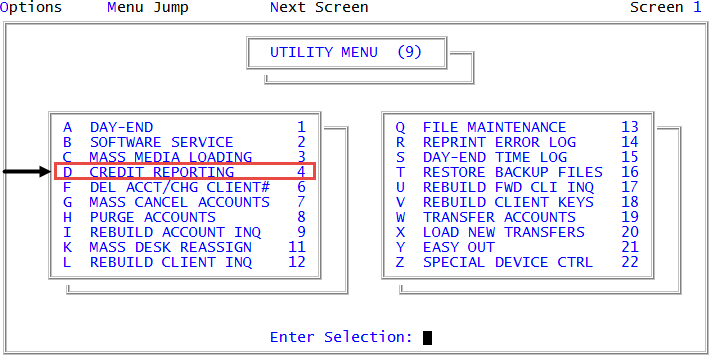
- In the Credit Reporting window, select Take Action on Account, and press Enter or click Ok.
- In the Enter Debtor Number(s) Separated by a Semicolon window, do one of the following, and press Enter or click Ok:
- Type one or more account numbers, separating each with a semicolon.
- Type a Get-List or Select statement. For more information, Working with Recall.
- In the Credit Reporting Actions window, select Cancel Due to Fraudulent Activity, and press Enter or click Ok.
- In the Enter New Status Code window, type a new status code, and press Enter or click Ok.
-
Do any of the following:
 Cancel credit reporting for an account not in a packet
- At the Ok To Proceed (Y/CR=N) prompt, type Y, and press Enter.
- At the Action accepted for debtor number prompt, press Enter or click Ok.
- In the Enter Debtor Number(s) Separated by a Semicolon window, to quit, click Cancel.
- In the Credit Reporting window, click Cancel.
Cancel credit reporting for all the accounts in a packet
- At the Apply updates to all packet members? prompt, click Yes.
- At the Ok To Proceed (Y/CR=N) prompt, type Y, and press Enter.
- At the Action accepted for debtor number prompt, press Enter or click Ok. Repeat for each account in the packet.
- In the Enter Debtor Number(s) Separated by a Semicolon window, to quit, click Cancel.
- In the Credit Reporting window, click Cancel.
Cancel credit reporting for a single account in a packet
- At the Apply updates to all packet members? prompt, click No.
- At the Ok To Proceed (Y/CR=N) prompt, type Y, and press Enter.
- At the Action accepted for debtor number prompt, press Enter or click Ok.
- In the Enter Debtor Number(s) Separated by a Semicolon window, to quit, click Cancel.
- In the Credit Reporting window, click Cancel.
Cancel credit reporting for multiple accounts in a packet
- At the Apply updates to all packet members? prompt, click Select.
- At the Ok To Proceed (Y/CR=N) prompt, type Y, and press Enter.
- At the Credit reporting has been cancelled for debtor number prompt, press Enter or click Ok.
- At the OK to Update Account number prompt, press Enter.
- Repeat Steps b-c for each account in the packet.
- In the Enter Debtor Number(s) Separated by a Semicolon window, to quit, click Cancel.
- In the Credit Reporting window, click Cancel.