Menu 11.11 - Performance Letter
The Performance Letter report is a monthly report to precollect clients. Print and send this to clients immediately before the precollect Month-End. Statistics in the report come from the Preclient Update screen. For more information, see Menu 11.2 - Precollect Update.
To run a monthly Performance Letter report for precollect clients:
-
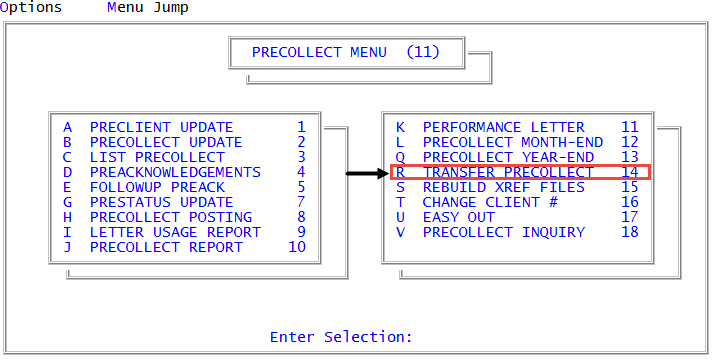
From the Master menu, navigate to
 Precollect > Performance Letter (menu 11.11).
 - At the This program will print a Performance Letter for precollect clients. OK to continue?, to continue, press Enter or click Ok.
- In the Enter Preclient Number(s) Separated by a Semicolon window, do one of the following:
- Type the preclient account numbers, separating each with a semicolon, and press Enter or click Ok.
- To include all accounts, press Enter or click Ok.
- To use a Get-List, type the list name, and press Enter or click Ok. For more information, see Working with Recall.
- In the Enter 'Period Ending' Date to Appear on Report window, do one of the following:
- To use the default date displayed in the window, press Enter or click Ok.
- To enter a new date in which the report includes collection activity for the month, type it, and press Enter or click Ok.
- At the OK to print? prompt, to continue, press Enter or click Ok.
The following is an example of the Performance Letter report:
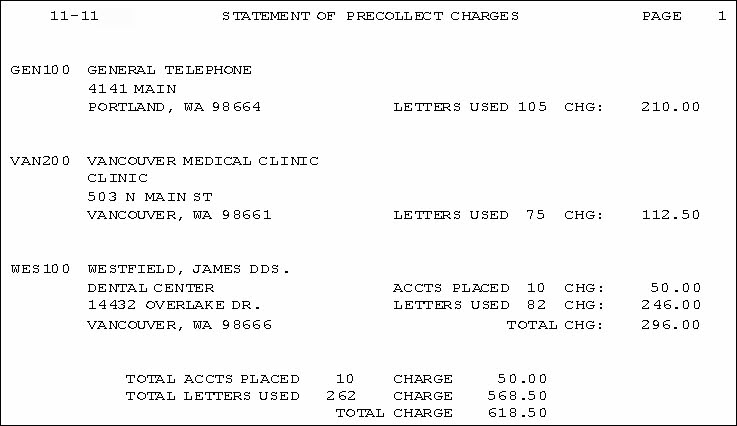
The following table describes the fields in the report:
|
Field |
Description |
|
Letters Used |
The number of letters used and the corresponding charge is listed on the right side of the statement for each client. If no letters were sent, this item is not shown. |
|
Accounts Placed |
The number of accounts placed with the agency by the client and the corresponding charge are listed on the right side of the statement. If no accounts were placed, this item is not shown. |
|
Total Accounts Placed |
This item shows the total number of accounts placed with the agency by all clients and the corresponding charges for the statement period. This is printed at the bottom of the statement. |
|
Total Letters Used |
The total number of letters used for all clients and the corresponding charges for the statement period is listed at the bottom of the statement. |
|
Total Charge |
The total of charges for all accounts placed and all letters used during the statement period is the last listing at the bottom of the page. |