Sending messages
Your agency may or may not allow you to send messages in The Collector System. For more information, see User logins.
To send a message:
- Access the Message program in one of the ways described in Viewing your messages.
- At the 'MESSAGES' - Enter Employee Initials (CR=initials, G, PB, /, ?) prompt, do one of the following:
- Type the initials of the employee you are sending a message to, and press Enter.
- To view a list of employee initials, type ?, and press Enter.
To select from your employee phone book, type PB, and press Enter.
For detailed information on employee phone books, see Using employee phone books.
-
At the employee name -- OK to Continue (CR=Y, N) prompt, do one of the following:
- If this is the correct employee, press Enter.
- To return to the 'MESSAGES' - Enter Employee Initials (CR='initials', G, PB, /, ?) prompt to enter different initials, type N, and press Enter.
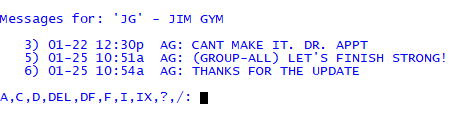
Your messages, or the messages you have sent to this employee, display.
- At the A,C,D,DEL,DF,F,I,IX,?,/ prompt, type A, and press Enter.
-
At the message prompt (+), type your message. When you finish entering the message, press Enter twice.
If your system administrator has configured your system to do so, the name and number of the account currently on your screen when you entered the Message program also displays:
ACCOUNT#: 43618 JOHNSON, HAROLD+ |The end mark (|) shows the location of the end of the line. When you enter messages that extend more than one line, you do not need to press Enter at the end of a line; The Collector System automatically puts line breaks between words when you are done.
The system administrator determines if the account number is automatically included when the message is sent from the Collector screen. This allows for efficiency and reduces mistakes made by typing in the wrong account number.
- At the Is this Message OK? (Y, N, Change) prompt, do one of the following:
- To proceed with sending the message, type Y and press Enter.
- To exit without sending the message, type N and press Enter.
- To make changes to the message, type C and press Enter.
- At the Enter Line to Change or Press <CR> to File prompt, type the line number and press Enter.
- Make the changes to the message and press Enter.
- At the Enter Line to Change or Press <CR> to File prompt, press Enter.
- At the Enter Date to Send 'mm-dd-yy' (CR=Today) prompt, do one of the following:
- To send the message today, press Enter.
- To send the message on a different date, type the date, in MM-DD-YY format, and press Enter.
- At the Enter Time to Send 'hh:mm' (CR=NOW) prompt, do one of the following:
- To send the message now, press Enter.
- To send the message at a later time, type the time, in military format (hh:mm), and press Enter. For example, 2:30 p.m. is 14:30.
-
The Collector System saves the message and returns to the A,C,D,DEL,DF,F,I,IX,?,/ prompt. All of your messages to this person display, including the one just entered. Messages that have not yet been read are preceded by an asterisk (*).