Working with strategy actions
If an account is sent to a support desk that is configured to not allow a collector to work accounts, standard (not parallel or side-action) strategies are suspended.
Each Strategy Actions screen contains an action set, which is one or more actions listed under one name. Specified actions take place automatically if a test on the Strategy Conditions screen is met or if the action follows an applicable event.
Values are the information that actions use to update an account. The type of value should be appropriate for the action. In many cases, the system informs you when a value is invalid. In some cases, the system does more than just validate the value you enter. For example, if you enter a value for a Change Desk action that does not match an existing desk, the system tells you that the desk (value) is invalid and prompts you with the option to add it as a new desk.
Values are also used to update information in an existing field or copy information from one field to another. If you enter a field number as a value in the system, you can then use an action to retrieve the information in that field. For example, if you use the Update Fiscal 200 action with a value of @D8, the value @D8 tells the action to update Fiscal 200 with the information stored in Debtor attribute 8. Thus the home phone number is copied to field 200 in the Fiscal file.
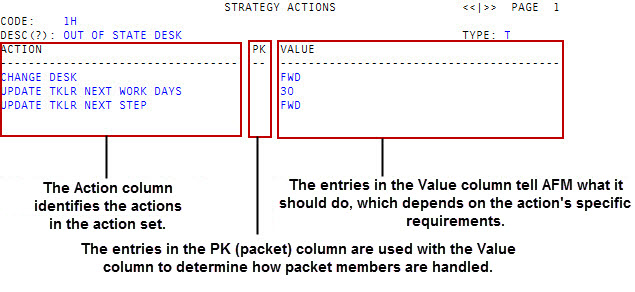
The Packet (PK) column is used with the Value column to determine how packet members are handled. The PK column can contain the letters N,X, Y, or an asterisk (*).
- N (or blank) – The accounts are handled on an individual basis.
- X – The column is not available for selection. This happens when an action has been chosen that makes packet handling unavailable. For example, the action Start Notice disable packet handling.
- Y or an asterisk (*) – The packets are handled based on the data in the Value column.
The fields in the Value column can contain one of the following types of entries, each of which determine how packet members are handled:
- Actual value – When the Value field contains an actual value, the specified value is applied to all packet members. There is no importance placed on the Y or asterisk (*); both are implied as yes to apply to all packet members. For example, if you choose the action to Change Desk to a default desk assignment criteria, all packet members associated with the account being changed are selected and are dealt out to the various desks in the desk assignment criteria.
- An @code – When the Value field contains an @code, the Y and asterisk (*) in the PK column take on the following meanings:
- Y – The field specified by the @code is applied to all accounts in the packet. The value of this field is taken from the field's value in each individual packet member. For example, if @F234 indicates a specific field, the same field is referred to in each account; however, the value of that field is determined by the contents of the specified field in each account.
- An asterisk (*) – The field specified by the @code is applied to all accounts in the packet. The value of this field in the account that you are currently working in is applied to all the packet members.
- Value inserted by the system – When the Value field contains an entry inserted by the system, the Y and asterisk (*) operators are not used. The entry in the Value column is applied to all packet members.
After the actions have completed, The Collector System moves sequentially to the right of the line until the next event, action, or strategy is indicated. The Collector System does not revert back to a condition after an action occurs until the last column indicates the path should revert to the top of the current strategy or another one.