Requesting credit reports for an account
A data vendor is a company that collects information such as phone numbers, addresses, or credit reports. Your organization can purchase information from a data vendor to better improve collection effectiveness. You can use the following data vendor companies:
- Equifax®
- Experian®
- LexisNexis®
- Trans-Union®
In The Collector System, you configure and manage these services using UltimateConnect. For more information regarding these add-on services, contact your Finvi Support representative. Each add-on service has its own setup guide for The Collector System. For more information, see the Ontario Community Document Library.
Credit information must be used for permissible business purposes only. Using consumer information for personal or non-business reasons is not authorized. Unauthorized access is a crime and may result in Federal prosecution. Clients are required to retain supporting documentation for each transaction.
To request credit reports for an account:
- Open an account in the Collector screen.
-
At the CMD prompt, type CR, and press Enter.
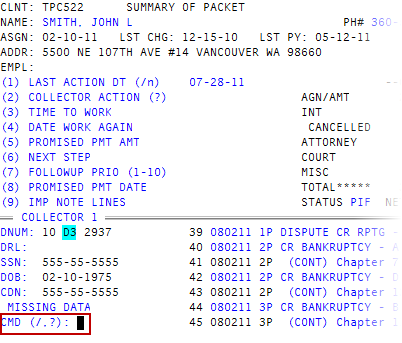
- In the Message from Associated Credit Bureaus window, click Ok.
- At the prompt, press Enter.
- In the Data Service Selection window, select a report, and press Enter or click Ok.
-
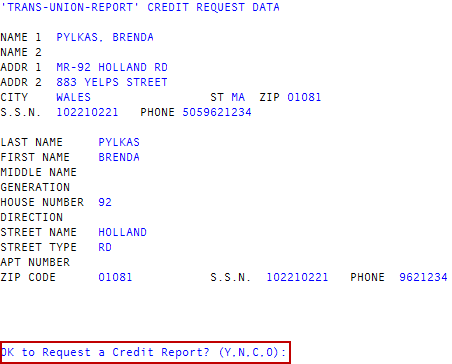
At the Ok to Request a data vendor Report prompt, do one of the following, and press Enter:
 Request the report
Type Y.
The report is requested.
Cancel the report
Type N.
The report is canceled.
Make a correction
- In the Last Name field, type a new last name, and press Enter, or press Enter to go to the next field.
- In the field, press Enter to go to the next field, or type new information, and press Enter. Repeat this procedure for each field.
Enter a keyword option
-
At the Enter Keyword Option prompt, type 1 or 2 for the keyword option you choose.
Option 1 corresponds to "SP" and option 2 corresponds to "SS." You can send information to get a report back for a spouse. SS means "spouse social security number" and Sp means "spouse."
- In the SS / SP field, type a keyword, and press Enter.
- At the Enter Keyword Option prompt, type /, and press Enter.
- At the Do You Wish to Request a Joint Report for Trans Union? prompt, do one of the following, and press Enter:
To request a joint report, type Y.
The report is requested.
To not request a joint report, press Enter, or type N.
A joint report includes both the Name and Name2 information.