Viewing contact information for a packet
In the Personal Contacts screen, use command PKT to enable Packet Mode. This mode displays the contact information for all the members of a packet that the account is a part of.
You cannot change any contact information when you are in Packet Mode.
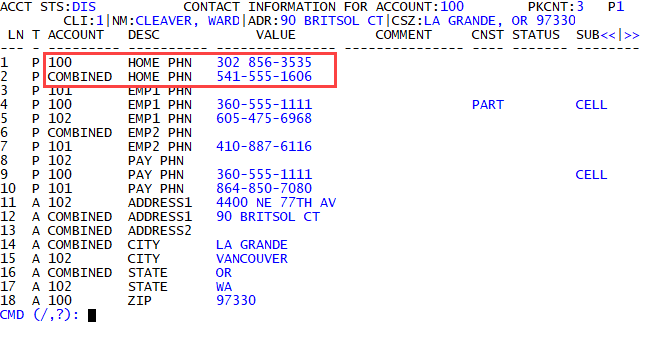
When packet members share the same specific contact information, such as a phone number, The Collector System displays Combined in the Account field. You can view the packet members that have the same contact information by clicking Combined.
In the following example, account 100075 has a unique home phone number, but the rest of the accounts in the packet share the same home phone number. The Collector System indicates this by displaying Combined in the Account field.
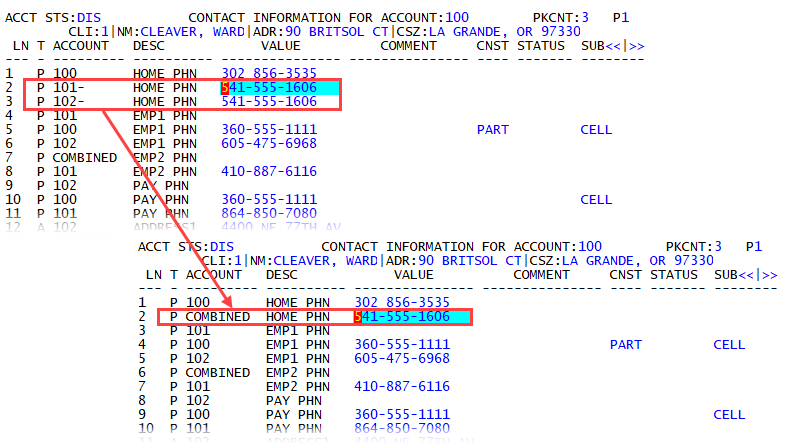
When you click Combined, the screen shows the list of all of the packet members that share the same home phone number. To return to Combined, click any of the account numbers with a hyphen (-) next to the number to collapse the list.
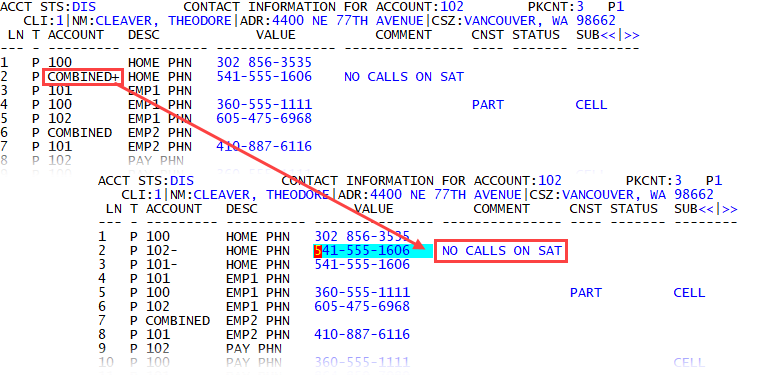
If a packet member has the same contact information, but other information in the line number are different, The Collector System displays Combined+ in the Account field. You can expand the list of accounts by clicking Combined+ to see what information is different in the row.
In the following example, the home phone number is the same for all of the accounts in this packet. When the collector clicks Combined+, however, there is a note in the Comment field for account 100025.
To view contact information for a packet:
- Open an account in the Collector screen.
- At the CMD prompt, type PC, and press Enter.
- In the Personal Contacts screen, at the CMD prompt, do one of the following, and press Enter:
- To enable Packet Mode, type PKT.
- To exit Packet Mode, type PKTX.