Defining account commission rates
You can override a client's default commission rate by entering a different commission rate, or commission code, in the Account record; this is the account commission rate.
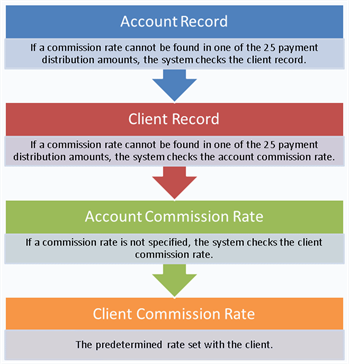
The commission rate on a payment is determined in the following way:
To define an account commission rate:
-
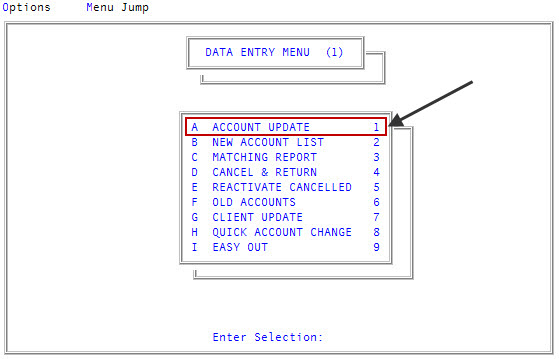
From the Master menu, navigate to
 Data Entry > Account Update (menu 1.1).
 - If The Collector System is in a preliminary Month-End process, the Preliminary Month End in Progress. Use Old or New Month? prompt displays. Do one of the following:
- To define an account commission rate for the old month, click Old.
- To define an account commission rate for the new month, click New.
- To return to the Data Entry menu, click Cancel.
- If the Batch Number to Update window displays, select one of the following, and press Enter or click Ok:
- Use Existing Batch
- New Batch Number
- Last Batch number
Go to Account Prompt
For more information, see Selecting batch options.
-
At the Enter Account # prompt, type the account number, and press Enter.
You may see an alert that a record is locked. This indicates that another user has the account open. The system displays a prompt with the user's initials. For a full list of the commands available at this prompt, see Working the Account# prompt options.
-
In the Name field, to move to the section of the screen which contains the Comm field, type /6, and press Enter.
Note: For a list of the commands available in this field, see Using Name prompt options.
- In the Status field, press Enter.
- In the Comm field, do one of the following:
- To assign a commission rate, type the rate in one of the following ways, and press Enter:
- As a decimal (example: 20% = .20)
- As a fraction (example: 20% = 1/5)
- To assign a commission code, type the code, and press Enter. For more information, see Menu 10.5.51 - Commission.
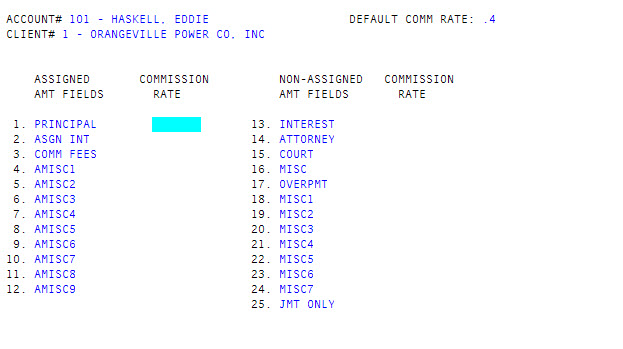
- To assign commission rates for specific financial categories, type /C, and press Enter.
- In the Commission Rate column of the Account Commission Update screen, for each amount field, type the commission rate or commission code associated with that amount, pressing Enter to move from one field to the next.
- To assign a commission rate, type the rate in one of the following ways, and press Enter: