Menu 10.1.4 - Credit Reporting
Your agency uses credit reporting to report accounts to the credit reporting agencies your agency subscribes to. You report accounts when they become delinquent to encourage the responsible customer to pay their debt and prevent them from becoming eligible for more credit.
Your agency may need to report to only one or to multiple credit reporting agencies. For example, a fictitious company, Lake Assets, reports to two different credit reporting agencies: Equifax and TransUnion. The collections manager at Lake Assets, Jane Smith, first adds the configuration for TransUnion, as shown below:
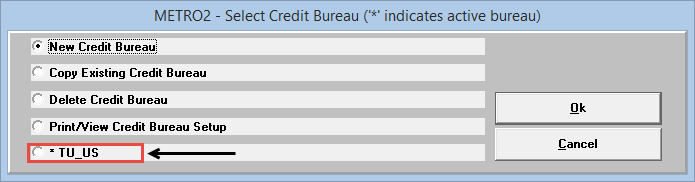
The asterisk displays because when Jane configured the parameters for TransUnion, she entered Y in the Actively Report This Bureau? field, as shown below:
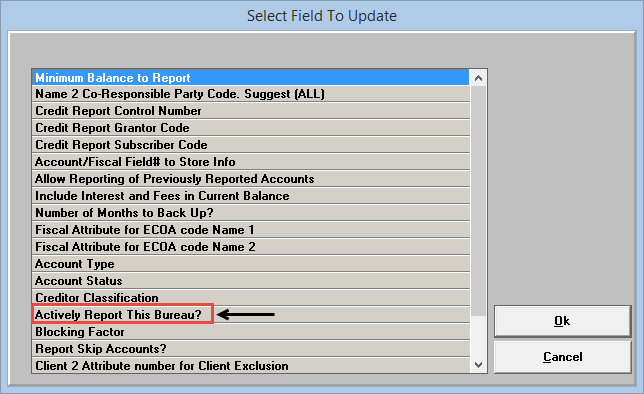
The asterisk shows that The Collector System will report to the credit reporting agency. If there is no asterisk next to the credit reporting agency name, then The Collector System will not send any account credit reporting information. If you set up multiple credit reporting agencies and set them as active, the user who runs the report will not have to choose which credit reporting agencies to send them to; The Collector System automatically selects all active credit reporting agencies. This ensures that, at time of generation, The Collector System reports all accounts in their current state to each of the configured, active credit reporting agencies.
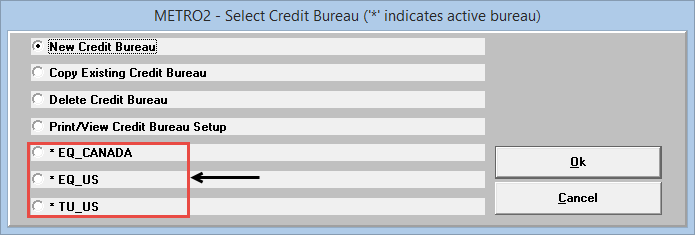
If needed, you can also set up multiple configurations for the same credit reporting agency. You may need to do this to report different types of information to the same credit reporting agency. For example, Lake Assets needs to send information to not only the U.S. office of Equifax, but also to Equifax Canada. To do this, Jane Smith first adds Equifax-U.S. and then adds Equifax-Canada. In The Collector System prompts her to select the Equifax configuration to report to, Jane selects both since she wants accounts reported to both. When she presses Enter, the Metro2 - Select Credit Bureau window displays both Equifax configurations, along with the TransUnion configuration, as shown below:
You can report to credit reporting agencies on demand whenever you need to. For more information on understanding and running credit reports, see Menu 9.4 - Credit Reporting.
Use caution when reporting accounts. To avoid legal ramifications or jeopardizing confidential customer information, review the following before reporting accounts:
- Credit reporting laws
- The Fair Credit Reporting Act section 623 (refer to https://www.ftc.gov/)
- Credit bureau settings in The Collector System
Before setting up your credit reporting agency, there are several tasks to complete, depending on how you want to configure the agency. To report multiple account types, store multiple creditor classifications, and exclude credit reporting agencies from the credit reporting process, you must create three corresponding miscellaneous fields. For more information, see Creating miscellaneous fields for credit reporting.
Refer to the table below for each setup task and the corresponding topic.
|
To do this... |
Refer to: |
|
Obtain your grantor code, subscriber code, or control code from your credit reporting agency. |
Contact your credit reporting agency representative for all codes. Each code is unique to your reporting agency. You need to obtain these codes to finish creating a credit reporting agency in The Collector System. Contact the following:
|
|
Define the relationship between the individual in the Name field to the individual in the Name2 field by creating a Fiscal field. |
|
|
Define the relationship between the individual in the Name2 field and the individual in the Name field by creating an ECOA Fiscal field. |
|
|
If you report multiple account types, create an Account Type field. |
|
|
If you report multiple creditor classifications, create a Creditor Classification field to store them. |
|
|
Create an omit field to exclude a credit reporting agency you choose from the credit reporting process. You can create as many omit fields as you have credit reporting agencies. |